Showing posts with label web design. Show all posts

Sunday, July 29, 2012

The Flow Chart Defined

Diagram or chart are a graphical or symbolic representation of a process. Each step in the process is represented by a different symbol and contains a short description of the process step. The flow chart symbols are linked together with arrows showing the process flow direction.


Flow Chart Overview

Flowcharts are used in designing and documenting complex processes or programs. Like other types of diagram, they help visualize what is going on and thereby help the viewer to understand a process, and perhaps also find flaws, bottlenecks, and other less-obvious features within it. There are many different types of flowcharts, and each type has its own repertoire of boxes and notational conventions. The two most common types of boxes in a flowchart are:
  • a processing step, usually called activity, and denoted as a rectangular box
  • a decision, usually denoted as a diamond.

Diagram Overview

 A diagram is a two-dimensional geometric symbolic representation of information according to some visualization technique. Sometimes, the technique uses a three-dimensional visualization which is then projected onto the two-dimensional surface. The word graph is sometimes used as a synonym for diagram.

Online Resources


there are Several online tools are available that help you create comprehensively designed flowcharts and graphs that worth a thousands words. Check them out and let us know what you feel about these tools.

LucidChart
With LucidChart you can you can create and publish customized flowcharts. It’s very easy to use and has a decent free option which includes 5 MB storage for your documents.


Creately
Here at Creately, we are focused on making it easier for teams to work collaboratively on all things visual. And we do this by giving you a great online application that's a breeze to use and an extraordinary customer service experience that you'll love.


Monday, July 9, 2012

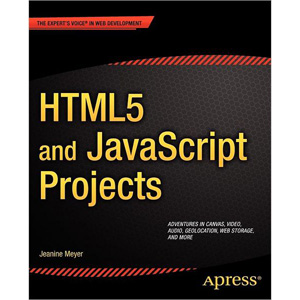
HTML5 and JavaScript Projects

 and Projects shows you how to build on your basic knowledge of and to create substantial applications.

Through the many interesting projects you can build in this book, you’ll build your skills for your future projects, and extend the core skills you may have learned with its companion book, The Essential Guide to 5. read more to download this book click here

Thursday, June 28, 2012

How To Make Comments Ribbon Icon in Photoshop

Learn How To Make Comments Ribbon Icon In Photoshop! learn how to Create Comments Ribbon Icon in Photoshop.

firstly create the black background, then work on the many layers, text layers and other useful techniques related this tutorial. This tutorial is very simple to follow, so I suggest to everyone to give a try.

Monday, May 14, 2012

Drupal vs Joomla

Drupal v Joomla The CMS Comparison

Here's a Drupal - Joomla shootout based on a feature matrix, lower down the page. We don't normally do this as you also need to explain the numbers, so it's not a foolproof system - it always needs the explanations. In addition you really need to compare like with like, otherwise the result can be meaningless.

Saturday, October 16, 2010

Securimage CAPTCHA -Telling Humans and Computers Apart Automatically


A CAPTCHA is a program that can generate and grade tests that humans can pass but current computer programs cannot. For example, humans can read distorted text as the one shown below, but current computer programs can't:

Guidelines
If your website needs protection from abuse, it is recommended that you use a CAPTCHA. There are many CAPTCHA implementations, some better than others. The following guidelines are strongly recommended for any CAPTCHA
  •  Accessibility.
  • Image Security.
  • Script Security.
  • Security Even After Wide-Spread Adoption.

reCAPTCHA | http://www.google.com/recaptcha


reCAPTCHA is a free CAPTCHA service that helps to digitize books, newspapers and old time radio shows. Check out our paper in Science about it (or read more below).


Capthas.net | http://captchas.net/


A CAPTCHA image shows a random string which the user has to type to submit a form. This is a simple problem for (seeing) humans, but a very hard problem for computers which have to use character recognition, especially, because the displayed string is alienated in a way, which makes it very hard for a computer to decode.


ProtectWebForm | http://www.protectwebform.com/

Insure yourself from spam! The Anti Spam Insurance Company - ProtectWebForm!
Spam is not delivered manually. There are many so-called spam robots (bots) which are spidering the web in order to find the form. Whenever such robots find the web form it tries to post a spam message to it. The only solution to protect your form is to add a verification image. This method will not protect you from spammers that are delivering their spam manually, but it will stop all the spam bots. Statistics show that spam delivered manually is less than 0.01% of all web form spam.

Classic ASP Security Image Generator (CAPTCHA) http://www.tipstricks.org/


Generate images with letters and numbers to make a CAPTCHA test.
  • Completely FREE Classic ASP VBScript.
  • The secure code is completely random.
  • Dynamic image processing.
  • No image file requires.
  • No components require.
  • Create a cross browser compatible BMP images.
  • You can use a custom color palette for image.

adBrite